Weekly AI Skills: 10 Selected GitHub Repositories Ranked by Stars
A selected sample of public repositories with actual SKILL.md files, with use cases, GitHub links, exact star counts, and clearly defined download limitations.

Cover image: AI-generated editorial illustration.
AI skills can have similar names while doing quite different jobs. Some organize a coding workflow; others help with interface design or documents. This week, we selected 10 public GitHub repositories and looked at what each is for. Every repository has an actual SKILL.md file on its default branch. General-purpose models and frameworks are outside the scope.
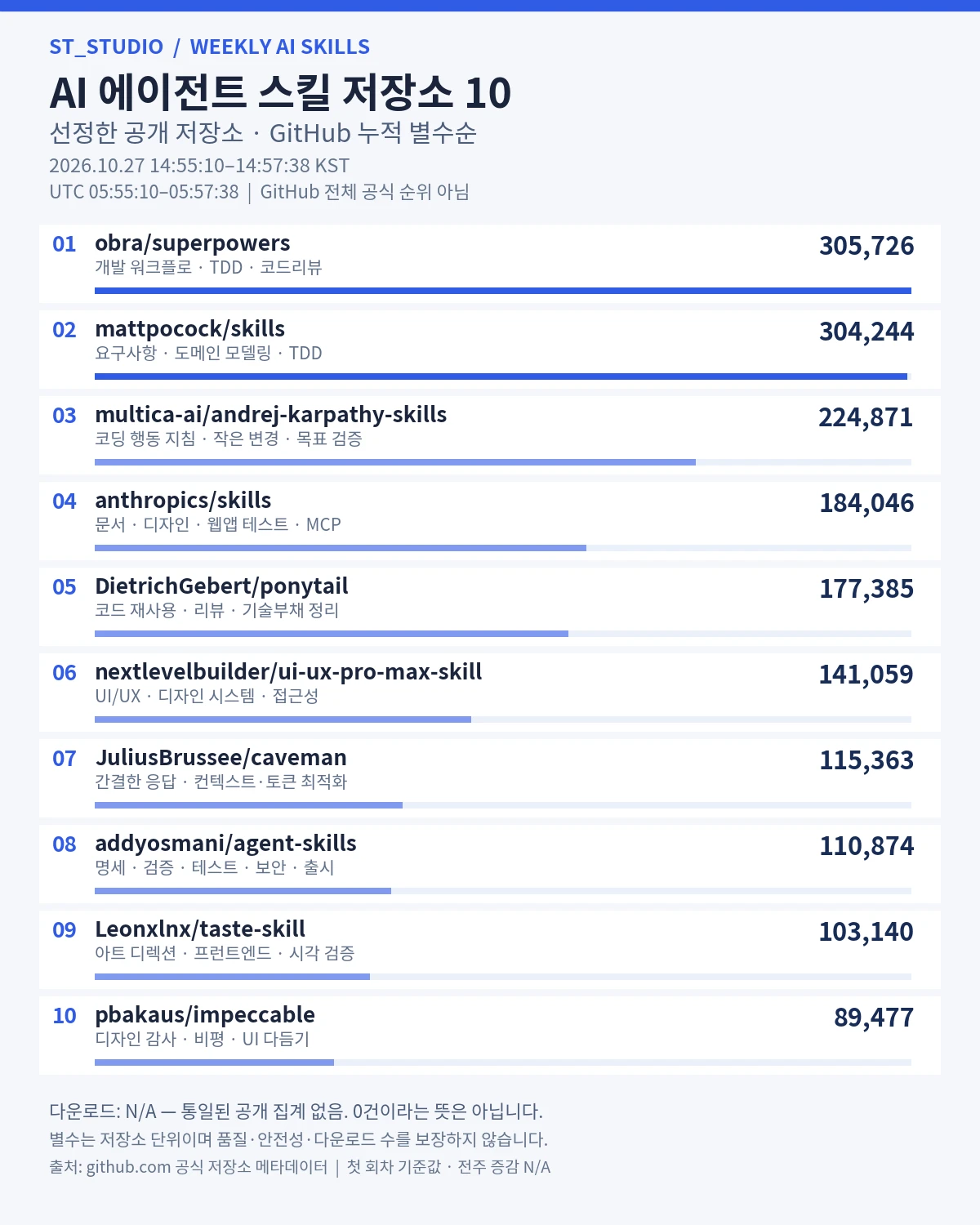
The repositories below are ranked by cumulative GitHub stars within this selected sample. This is not an exhaustive or official GitHub Top 10, and it is not a weekly growth ranking.
Snapshot: October 27, 2026, 05:55:10–05:57:38 UTC / 14:55:10–14:57:38 KST. Exact star counts were read from official GitHub repository metadata.
Choosing a first skill
Start with one task that is currently stuck rather than installing all ten. Unclear requirements call for questioning and planning; growing code calls for reuse and review; an underdeveloped interface calls for design work. The prompts below are illustrative examples, not reported test results.
Installation routes were checked against each repository’s official README. Terminal commands and agent-chat commands are identified separately. npm, npx and plugin installation can bring in executable third-party code. Review project policy, changed files, hooks and scripts before proceeding.
The 10 selected repositories
1. obra/superpowers
Collection · Composable development workflows for planning, test-driven development, debugging, and code review.
Stars: 305,726 · Downloads: N/A
When the agent starts building before you have agreed on the brief, try giving it an explicit approval point: “Plan reservation cancellation, including the deadline and refund rules. Wait for my approval before implementing.”
A full development workflow may be unnecessary for a small copy change. The README directs Codex app users to Plugins → Coding → Superpowers → +. In Codex CLI, open /plugins, search for Superpowers and select Install Plugin. Install separately for each agent you use. Official setup and usage
2. mattpocock/skills
Collection · Small engineering skills for requirements, domain modeling, TDD, and code review.
Stars: 304,244 · Downloads: N/A
Start with the questioning skills if the agent keeps misunderstanding the brief. Try asking: “Use /grill-with-docs to clarify whether members and subscribers are different, and record the signup decisions.” You can adopt individual practices rather than replace your whole process.
To add this skill collection to Codex CLI, run these two commands in a terminal:
codex plugin marketplace add mattpocock/skills
codex plugin add mattpocock-skills@mattpocock
Then run /setup-matt-pocock-skills in agent chat once per repository to choose issue tracking and document locations. Choose either the plugin or skills.sh copies; installing both duplicates the skills. Official setup and usage
3. multica-ai/andrej-karpathy-skills
Individual skill + rules · Coding guidelines that surface assumptions, limit changes, favor simplicity, and define verifiable goals.
Stars: 224,871 · Downloads: N/A
A one-bug fix should not become an unrelated refactor. A useful request here would be: “Fix only the empty-search error. Write a reproducing test first and leave unrelated files alone.” Check that each changed line serves that request.
One installation detail deserves attention. The README’s Claude Code chat commands are /plugin marketplace add forrestchang/andrej-karpathy-skills, followed by /plugin install andrej-karpathy-skills@karpathy-skills. Its installation owner differs from the current repository owner; inspect the destination before proceeding. A per-project CLAUDE.md is another option, but review and merge it rather than overwrite existing instructions. Official setup and usage
4. anthropics/skills
Collection · Anthropic’s official examples for design, documents, web-app testing, MCP development, and more.
Stars: 184,046 · Downloads: N/A
Are you inspecting a PDF or filling it in? Decide that before selecting a document skill. For example: “List the editable fields and required fields in this PDF. Do not fill anything in yet.” Separating inspection from editing gives you a useful review point.
In Claude Code chat, register /plugin marketplace add anthropics/skills, then install /plugin install document-skills@anthropic-agent-skills. Choose example-skills@anthropic-agent-skills for the design and development examples. These published examples do not guarantee identical behavior across apps; check a small sample in the file format you actually need. Official setup and usage
5. DietrichGebert/ponytail
Core + related skills · Guidance for reusing existing code, avoiding unnecessary implementation, reviewing changes, and tracking technical debt.
Stars: 177,385 · Downloads: N/A
If each feature brings another dependency or duplicate component, start with this request: “Add an admin date input, but first check our existing input component and the browser’s native controls.” The useful question is what can be reused, not how many characters can be removed. Keep validation and accessibility.
For Codex CLI, run these commands in a terminal: codex plugin marketplace add DietrichGebert/ponytail, then codex plugin add ponytail@ponytail. The README then asks you to trust two lifecycle hooks in /hooks and start a new thread. Review their behavior first.
Once installed, invoke $ponytail:ponytail-review in Codex CLI chat to review changes. Official setup and usage
6. nextlevelbuilder/ui-ux-pro-max-skill
Core + related skills · Searchable UI/UX guidance for typography, color, layout, accessibility, design systems, and implementation stacks.
Stars: 141,059 · Downloads: N/A
A useful starting point when your interface needs consistent design choices: “Propose color, type and spacing for a booking dashboard. Preserve components and business logic; check narrow screens and keyboard focus.” Ask separately for design recommendations and implementation.
The current package is ui-ux-pro-max-cli: run npm install -g ui-ux-pro-max-cli, then uipro init --ai codex inside the project. Search scripts require Python 3. Avoid outdated instructions for uipro-cli, and review the global package installation and project file changes first. Official setup and usage
7. JuliusBrussee/caveman
Skills + tools · Terse responses that retain technical substance, alongside context and token-optimization skills and tooling.
Stars: 115,363 · Downloads: N/A
For the skill alone, the README offers npx skills add JuliusBrussee/caveman -g. Invoke $caveman in Codex chat and say stop caveman to switch back. The -g flag installs globally. The separate full CLI includes a proxy and additional optimization features, so do not confuse it with a writing-style change. Published savings are not a forecast for your workload.
For a compact technical exchange, you might ask: “Give me the failure cause, edit location and rerun command. Keep important warnings.” Shorter explanations can be unhelpful when learning a concept or reviewing a decision. Official setup and usage
8. addyosmani/agent-skills
Collection · Engineering workflows with verification steps across specifications, planning, implementation, testing, security, and release.
Stars: 110,874 · Downloads: N/A
If “finished” is hard to distinguish from “verified,” start with acceptance criteria: “Specify CSV export first. Include Korean text, empty data and unauthorized users in the acceptance criteria; do not implement yet.” That specification can anchor the later implementation, verification and release steps.
For Codex CLI v0.122+, the README lists these terminal commands: codex plugin marketplace add addyosmani/agent-skills, then codex plugin add agent-skills@agent-skills. It also warns that installing one skill through npx can omit shared repository-level references. Choose the installation route with those supplementary checklists in mind. Official setup and usage
9. Leonxlnx/taste-skill
Individual skill + scripts · Frontend design guidance combining art direction, reference images, browser checks, and screenshot-based refinement.
Stars: 103,140 · Downloads: N/A
Imagine starting a page for a specific business: “Build an independent bookshop event page around our book photos and event details. Check that the title and signup button work on mobile.” Supply your own brand assets when available.
Install from a terminal with npx skills add https://github.com/Leonxlnx/taste-skill --skill "design-taste-frontend". Its scripts need Node 22+ and Chrome, Edge or Chromium; image searches need network access. Check image credits and usage terms in the result. Repeated browser inspection may be excessive for a simple copy edit. Official setup and usage
We also have design-taste-frontend installed in our Codex environment. This entry covers its setup and example uses rather than results from applying it to our work.
10. pbakaus/impeccable
Individual skill + tools · A core UI design skill with commands and browser tools for auditing, critiquing, and polishing interfaces.
Stars: 89,477 · Downloads: N/A
For an existing screen, ask for a review before a redesign: “Audit checkout for contrast, narrow-screen overflow and error messages. Show findings before editing.” Follow with targeted polish or harden work rather than a full redesign.
In a terminal, run npx impeccable install from the project root, select providers and project/global scope, then reload your tool. In agent chat, run /impeccable init to establish project context. The engine binary may download on first use, and Codex requires project-hook approval. Review those downloads and automatic actions: this is more than copying text instructions. Official setup and usage
Do more stars mean more downloads?
They are different measures. Stars reflect interest in the whole repository. They do not belong separately to every skill in a collection and are not a quality or safety score.
N/A does not mean zero downloads. GitHub release-asset downloads, npm or PyPI package downloads, and skills.sh installations cover different objects and distribution channels. No consistent public download total was available across this sample, so those metrics were not combined.
This edition establishes the first baseline. Week-over-week changes are N/A; subsequent snapshots can compare actual observations for the same repositories.
GitHub’s public download_count applies to an individual release asset. GitHub documentation
skills.sh ranks skills using anonymous installation telemetry from its CLI, not all downloads across every channel. skills.sh documentation
Before using a skill
Review its README, SKILL.md, permissions, scripts, and license. This ranking is based on public-source research, not comparative performance testing or a security audit of the ten skills.
Licenses can differ even within one collection. Many Anthropic examples use Apache-2.0, but its docx, pdf, pptx, and xlsx skills are source-available under separate terms. The individual multica-ai karpathy-guidelines skill declares MIT, while the repository-level license field is separate. Caveman states that version 3.0.0 onward uses Apache-2.0; older releases retain their original terms. Anthropic README, Karpathy-inspired skill, Caveman licensing
The Agent Skills format centers on a SKILL.md containing metadata and instructions, with optional scripts and reference materials. Agent Skills specification
How we use skills at ST Studio
Separately from the ten repositories ranked above, we have used other skills in our work. We used agency-ui-designer to work on thumbnail placement in the homepage listings and main view, and better-accessibility to check homepage accessibility and mobile navigation. agency-ui-designer source
We used better-writing to remove repeated explanations from our introduction copy and SmartGIF instructions. Headroom helped summarize errors in long inspection and build logs. We choose skills around the material at hand: the interface, the wording or the logs. The Headroom skill we used
Comments
Korean and English comments appear together in their original language.
Loading comments…
Leave a comment
No account or email needed. Comments appear after administrator approval. Use a password you do not use elsewhere; there is no password recovery. Do not include personal information, links, images, or HTML. Privacy details