Getting Started with Ollama: Edit a Short Draft with a Small Local Model
You do not need to start with a large model. Give a small local model one short text and check whether it preserves the original meaning and numbers.
Cover image: AI-generated editorial illustration.
You do not need a large model or an autonomous coding agent to try local AI. Start with one short draft and check how well the model preserves its meaning.
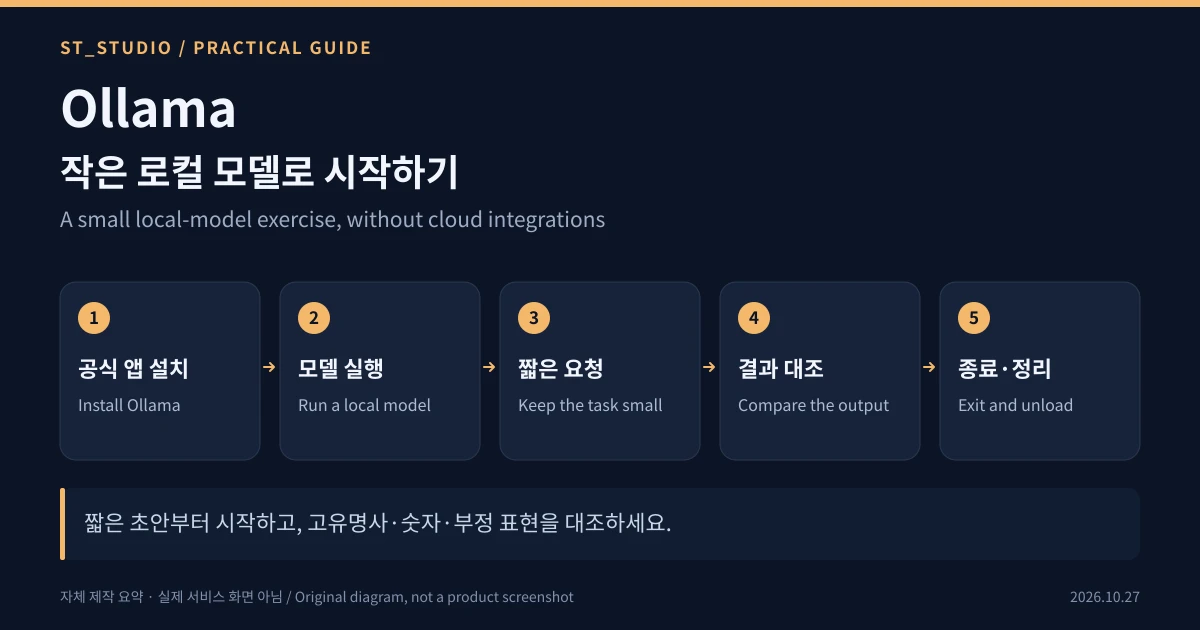
Use just one small model for this exercise
A personal computer that can run Ollama, an internet connection, and a short, non-sensitive text. This exercise uses qwen3:0.6b. Its listed download is about 523MB; that is not its runtime memory requirement. Official model page
From installation to the first sentence
1. Install Ollama from its official site and start it.
It supports macOS, Windows and Linux. This local-model exercise needs neither a cloud account nor an API key. Quickstart
2. Run ollama run qwen3:0.6b in a terminal.
The first run downloads the model before opening a chat.
3. Give it a small task.
Try: “Shorten these three sentences without changing their meaning or numbers. Add no new information.” Paste your draft. For multiline input, wrap the text in """. CLI guide
4. Compare the result with the original.
Check names, numbers and negations. Ask for a correction or edit the sentence yourself when meaning changes. Fluent wording is not factual verification.
5. Exit with /bye.
In another terminal, use ollama ps to inspect loaded models. Use ollama stop qwen3:0.6b if you want to unload this one. Exiting chat · Model management
Check that the original meaning survives
Try short title candidates or sentence edits whose output you can check directly. Evaluate Korean quality and instruction-following yourself. Do not expect this small exercise to handle long-document analysis or current web research.
Local costs and data boundaries
Running on your own computer requires no Ollama subscription, but hardware and electricity still cost money. Cloud models have separate charges. Pricing
Ollama says it cannot see prompts when models run locally. Connected apps, cloud models and web search can change that data flow. Use only the CLI for this exercise, and do not expose the default local server address to the internet. Privacy and network FAQ
Official documentation checked October 27, 2026. Check each model’s terms separately.
Comments
Korean and English comments appear together in their original language.
Loading comments…
Leave a comment
No account or email needed. Comments appear after administrator approval. Use a password you do not use elsewhere; there is no password recovery. Do not include personal information, links, images, or HTML. Privacy details