Review an AI-written reply before sending it: An n8n workflow
Connect information retrieval, drafting and approval. Weigh the flexibility of self-hosting against the work of operating it.

Cover image: AI-generated editorial illustration.
An AI-written reply is not always ready to send to a customer. n8n is an option when you want to connect information retrieval, drafting, and a human review step. It links models with tools and memory and combines steps into workflows. It can suit solo business owners with recurring tasks or creators who want to reduce copying and pasting between services. AI integration
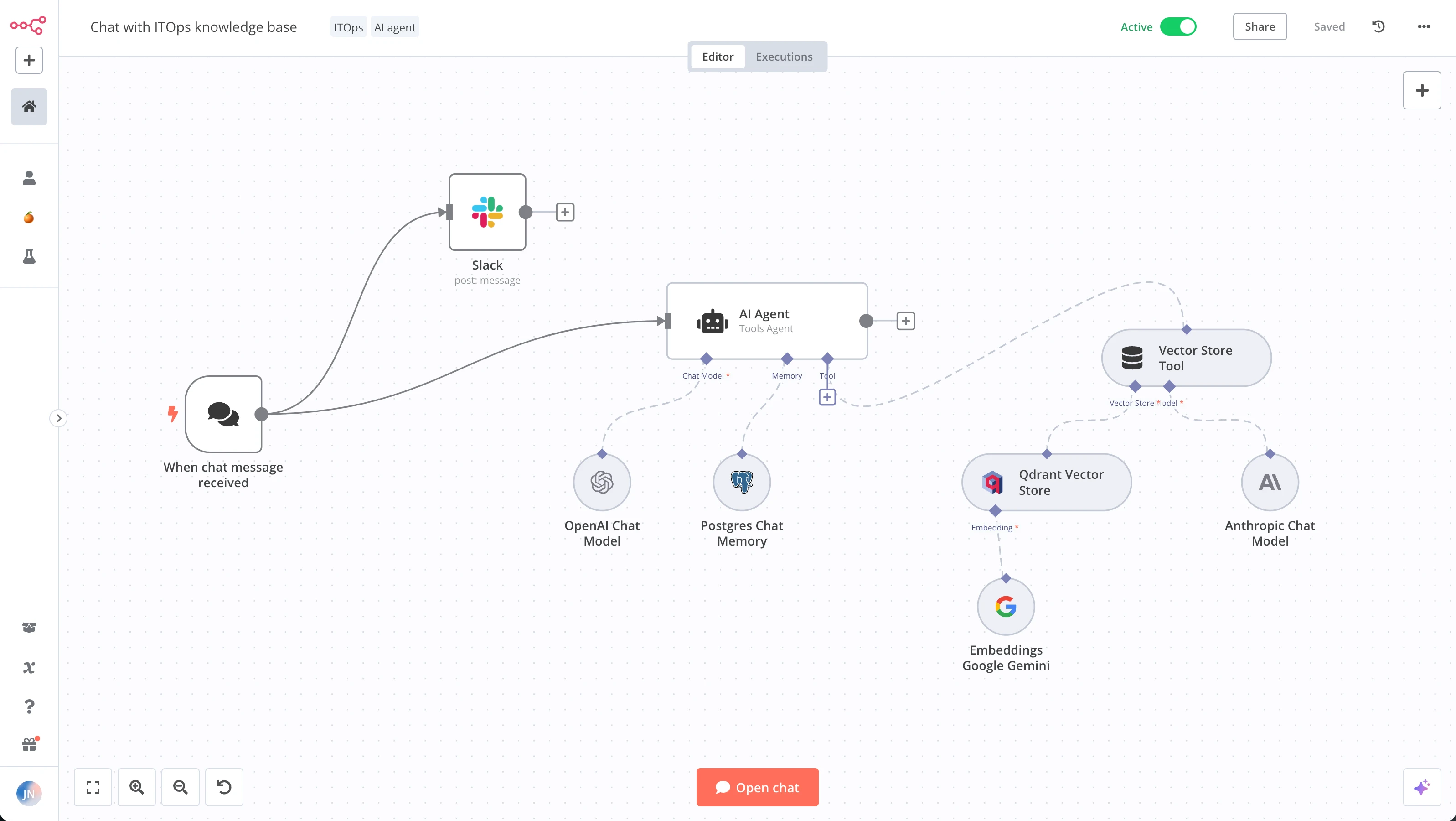
You can separate tasks that need AI judgment from steps that should follow fixed rules. AI might classify a request and draft a response, while sending happens only after a person approves it. The current Agents feature is in Preview and supports approving or rejecting sensitive tool calls. Start with reading information and producing drafts instead of granting every permission at once. Agents guide
The free Community edition is self-hosted. A free license does not mean someone else manages your server, backups, or updates. The Sustainable Use License permits internal business purposes and personal or noncommercial use, but does not broadly permit reselling n8n itself as a paid service. Hosting guide, License
If you prefer managed hosting, consider paid Cloud plans. As of the information-check date, Starter costs the equivalent of €20 per month when billed annually and includes 2,500 monthly executions. Billing is based on executions rather than the number of steps. Also check how your connected AI models are accessed and what their limits are. Pricing
Once the workflow is connected, try giving it deliberately awkward inputs. Test misclassified requests, empty fields, and duplicate executions. A useful first flow is “ten sample requests → information retrieval → draft response → human review.” For a simple scheduled copying task, fixed rules without an agent may be a better fit.
Start with a delivery-status draft
Suppose a solo shop owner repeatedly receives “Where is my order?” messages. Make the first workflow retrieve information and prepare a reviewable draft, rather than send replies. Use fictional order numbers and delivery states instead of real customer data while testing.
Example input: “Please check delivery status for order TEST-104.” A proposed agent instruction is: “Use only facts returned by the order lookup tool. If the order number is missing or not found, draft a clarification question. Do not guess an arrival date. If sending is denied, do not try again; leave the draft for review.”
Put approval in the tool connection
Connect a test trigger, AI Agent and Chat Model. Give the order lookup tool read-only access. The AI Agent requires at least one connected tool. AI Agent node
Initially omit the sending tool. Compare the draft against the order number and source status.
When ready to test sending, add Human review through the AI Agent's Tools panel, configure a review channel and recipient, and connect the sending tool through that review step.
Show the proposed recipient and message alongside the tool name. The documented $tool.name and $tool.parameters values help build the review message. Avoid copying unnecessary personal data into that channel. Approval configuration
Enforce approval beyond the prompt
Writing “ask for approval” in a prompt while directly connecting an unrestricted sending tool is a different setup. Enforce the pause at the tool connection. This example uses the workflow canvas's AI Agent node; distinguish it from the similarly named Agents Preview product mentioned earlier.
Test the awkward cases
A missing order number should produce a clarification, not a lookup or send.
A nonexistent order should not acquire an invented delivery date.
Rejecting approval should leave the sending tool unexecuted.
Duplicate requests should be distinguishable from new requests.
A failed lookup should remain a failure, not become a normal “in transit” reply.
Add a separate duplicate check
Do not rely on model memory for duplicate protection. Consider storing request identifiers and checking them with fixed rules. Inspect input, retrieved facts, approval and actual sending outcome separately. Before retrying a failed execution, establish whether the earlier message already went out.
Use AI only where interpretation is needed
If the job simply inserts known fields into a fixed response, ordinary workflow nodes may be enough. Use AI where varied wording needs classification or explanation. Set a maximum iteration count for model loops. Loop and cost controls
A Cloud execution and an external model charge are different units. One workflow run can contain several model calls. Check included AI allowances or separate provider charges for the connection you choose. n8n pricing
Official sources checked: October 27, 2026.
Comments
Korean and English comments appear together in their original language.
Loading comments…
Leave a comment
No account or email needed. Comments appear after administrator approval. Use a password you do not use elsewhere; there is no password recovery. Do not include personal information, links, images, or HTML. Privacy details